
If you are still paying for expensive software in 2026, you are wasting your money. Seriously.
In the last two years, I have tested more than 60 AI tools – some were amazing, some were complete garbage, and some looked free but asked for a credit card after 2 minutes. That frustration is exactly why I wrote this guide.
This is not a copied list from Google. This is my real experience with the best free AI tools in 2026/27 that actually work, without a credit card, without hidden limits, and without technical skills.
Whether you are a student, a freelancer, a YouTuber, a small business owner, or just someone who wants to save time, these 10 tools will change how you work.
Let’s dive in.
Table of Contents
Why Free AI Tools Are So Powerful in 2026?
A few years ago, AI was only for big companies. Today, anyone with a phone can create a full blog post, design a logo, edit a video, and even build a website – all for free.
Here is why free AI tools are winning in 2026:
- No Cost to Start: You can test an idea without spending a single dollar.
- Save 5-10 Hours Per Week: AI does the boring work like writing emails, summarizing PDFs, and creating captions.
- Best AI Tool for Business: Small businesses are now using AI tools for business workflow analysis, customer support, and marketing.
- Perfect for Beginners: You don’t need to learn coding. Just type in normal English, like you are talking to a friend.
But here is the honest truth – not all free tools are good. Some are slow, some give wrong answers, and some steal your data. That’s why I filtered only the best ones for you.
How I Tested These Tools (My Honest Method)
I did not just read other blogs. I actually used each tool for at least 7 days for real work – writing articles, making thumbnails, editing Reels, and doing research.
I judged them on 5 things:
- Is it really free? No credit card trick.
- Is it easy to use? Can a beginner use it in 5 minutes?
- Quality of output: Does it sound human or robotic?
- Daily limits: Can you use it every day?
- Best for what? Writing, image, video, or business?
Now, let’s look at the top 10.
1. ChatGPT – Best Free AI Tool Overall
If you only download one tool from this list, make it ChatGPT. It is still the king in 2026.
ChatGPT is like having a smart assistant who never sleeps. You can ask it to write a blog post, explain a difficult topic, write a job application, plan your trip, or even help you with coding.
What I love about it:
I used ChatGPT to outline this whole article in 30 seconds. For students, it can explain math like a teacher. For business owners, it can write product descriptions and Instagram captions in seconds.
Best For: Writing, brainstorming, coding, learning, daily questions
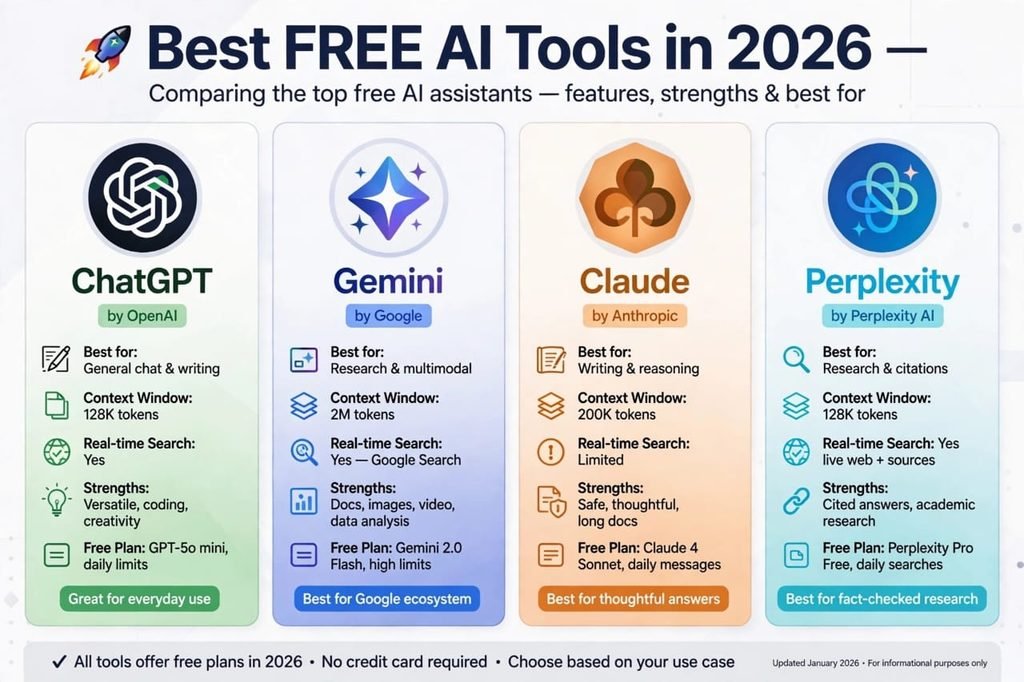
Free Plan: Yes, you get the GPT-5o mini model for free with daily messages. No credit card needed.
Pros:
- Super easy to use, even for beginners
- Best for general chat and writing
- Works on mobile and desktop
- Huge community and templates
Cons:
- Free version is sometimes slow during peak hours
- It can give wrong facts, so always double-check important data
- Image generation is limited in free plan
My Honest Opinion: 9.5/10. It is not perfect, but for 90% of daily work, it is enough.
2. Google Gemini – Best Free AI for Research and Google Users
If you use Gmail, Google Docs, and YouTube, then Gemini will feel like magic.
Gemini is Google’s AI, so it is directly connected to Google Search. That means it gives fresher answers than most other tools. I asked it about a news event from yesterday, and it gave the correct answer with sources. ChatGPT free version struggled with that.
Best For: Research, summarizing YouTube videos, analyzing PDFs, Google Docs work
Free Plan: Yes, Gemini 2.0 Flash is free with high limits.
Pros:
- Best for real-time information and research
- Can read your Google Docs and summarize them
- Great for multimodal – text, image, video, and voice
- Very fast
Cons:
- Sometimes answers are too short
- Not as creative as ChatGPT for storytelling
- Needs a Google account
My Honest Opinion: 9/10. If you are a student or researcher, this is your best friend.
![Image 2 – Using Free AI Tools For Work]
3. Claude – Best Free AI for Human-Like Writing
Claude is my personal favorite when I want writing that sounds like a real human wrote it.
Where ChatGPT sometimes sounds robotic, Claude sounds thoughtful, calm, and natural. I use it when I want to write emails, long articles, or business proposals that don’t feel like AI.
Best For: Long-form writing, reasoning, thoughtful answers
Free Plan: Yes, Claude Sonnet is free with daily message limits.
Pros:
- Most human-like writing style
- Great for long documents – can handle 200K tokens
- Safe and thoughtful answers
- Best for editing and improving your own writing
Cons:
- Daily limit is lower than ChatGPT
- No real-time web search in free version
- Image generation is weak
My Honest Opinion: 9/10 for writers. If you are a blogger, you must try it.
4. Perplexity AI – Best Free AI for Fact-Checked Answers
Do you hate when AI makes up fake facts? Then you will love Perplexity.
Perplexity is not a chatbot, it is an answer engine. Every answer comes with real sources and links. When I was writing a business article, I used Perplexity to check stats, and it saved me from posting wrong data.
Best For: Research, fact-checking, news, academic work
Free Plan: Yes, free with daily searches.
Pros:
- Gives answers with citations and sources
- Best for fact-checked research
- Very good for students and journalists
- Clean and simple interface
Cons:
- Not good for creative stories
- Free version has limited Pro searches
- Sometimes too to-the-point
My Honest Opinion: 8.8/10. Use it when accuracy matters more than creativity.
5. Canva AI – Best Free AI Tool for Design
You don’t need to be a designer anymore. Canva AI can do it for you.
I am not a designer, but with Canva AI, I made YouTube thumbnails, Instagram posts, and even a logo for a client in 10 minutes. Just type “Make a thumbnail for a travel vlog” and it will give you 5 designs.
Best For: Social media posts, thumbnails, presentations, logos
Free Plan: Yes, generous free plan with Magic Studio features.
Pros:
- Easiest design tool in the world
- Thousands of free templates
- AI image generation and background remover
- Perfect for beginners
Cons:
- Free version has watermark on some premium elements
- Limited brand kit features
- Not for professional Photoshop-level editing
My Honest Opinion: 9/10 for creators. If you post on Instagram or YouTube, this is a must-have.
6. CapCut AI – Best Free AI Tool for Video Editing
Video is king in 2026. And CapCut is the reason anyone can go viral.
I edited a 1-minute Reel in CapCut using its AI captions, auto-cut, and trending templates. It took me 8 minutes. Earlier, the same work took 2 hours in Premiere Pro.
Best For: TikTok, Reels, YouTube Shorts, video editing
Free Plan: Yes, almost all main features are free.
Pros:
- Auto-captions are super accurate
- Free trending templates and music
- Image to video AI generator features
- Works perfectly on mobile
Cons:
- Some effects are paid
- Export quality is limited in free version for 4K
- App can be heavy on old phones
My Honest Opinion: 9.2/10 for video creators. Best free video editor right now.
7. Grammarly – Best Free AI for Writing and Grammar
Even if your English is not perfect, Grammarly makes you sound professional.
I use it every day. It fixes my grammar, makes my sentences clear, and even suggests a better tone. If you write emails for clients, this tool will save your reputation.
Best For: Emails, blog posts, CVs, professional writing
Free Plan: Yes, free grammar and tone check.
Pros:
- Fixes grammar in real-time
- Works in Gmail, Word, and Chrome
- Tone suggestions are very helpful
- Great for non-native English speakers
Cons:
- Free version does not rewrite full paragraphs
- Sometimes suggestions are too formal
- Premium is expensive
My Honest Opinion: 8.5/10. Small tool, but big impact on your professional image.
![Image 3 – Comparison of Best Free AI Tools]
8. Notion AI – Best Free AI for Productivity and Business
If your work is messy – notes everywhere, tasks forgotten – Notion AI will organize your life.
I use Notion AI for my business workflow analysis. It summarizes my meeting notes, creates to-do lists, and even writes project plans automatically. It is like a personal manager.
Best For: Notes, project management, business workflow, productivity
Free Plan: Yes, free for personal use with AI trial.
Pros:
- All-in-one: notes, tasks, docs, and wiki
- AI can summarize long notes in seconds
- Best AI tool for business workflow analysis
- Great for teams
Cons:
- Learning curve is a bit high for beginners
- AI features are limited in free plan
- Needs internet to work well
My Honest Opinion: 8.7/10. Once you learn it, you will never go back to paper notes.
9. Leonardo AI – Best Free AI for Image Generation
Want a beautiful image for your blog but don’t want to pay for stock photos? Leonardo AI is your answer.
I generated the featured images for this blog using AI image tools. Leonardo gives you high-quality, realistic images for free, every day. You can create product photos, YouTube thumbnails, or even AI art.
Best For: Blog images, AI art, thumbnails, product photos
Free Plan: Yes, daily free credits.
Pros:
- High-quality, realistic images
- Many styles – photo, anime, 3D, cinematic
- Commercial use allowed
- Easy prompt system
Cons:
- Daily credits run out fast if you generate too many
- Sometimes hands and faces look weird
- Queue can be slow
My Honest Opinion: 8.9/10. Best free alternative to Midjourney.
10. Microsoft Copilot – Best Free AI for Office Work
If you use Word, Excel, and Outlook, Copilot is built for you.
Copilot can summarize a 50-page Excel sheet in one line, draft an email from bullet points, and create a PowerPoint from your notes. For office workers, this is a game-changer.
Best For: Office work, Excel, Word, emails, presentations
Free Plan: Yes, Copilot in Edge and Bing is free.
Pros:
- Deeply connected with Microsoft Office
- Best for data analysis in Excel
- Can browse the web with sources
- Good for corporate work
Cons:
- Full features need Microsoft 365 subscription
- Not as creative as ChatGPT
- Interface can feel confusing
My Honest Opinion: 8.5/10. If you work in an office, you will love it.
Quick Comparison Table – Which Tool Should You Choose?
| Your Need | Best Free Tool |
|---|---|
| General Writing & Chat | ChatGPT |
| Research & Facts | Perplexity AI / Gemini |
| Human-Like Writing | Claude |
| Design | Canva AI |
| Video Editing | CapCut AI |
| Business & Productivity | Notion AI / Copilot |
| Image Generation | Leonardo AI |
| Grammar | Grammarly |
My advice? Don’t try to use all 10 at once. Start with 3: One for writing (ChatGPT or Claude), one for design (Canva), and one for video (CapCut). That combo alone can run a whole business.
The Dark Side of Free AI Tools – What No One Tells You
I want to be honest with you. Free AI tools are amazing, but they are not 100% perfect.
1. Privacy Risk: Never paste your passwords, bank details, or private client data into any free AI tool. Free tools often use your data to train their models.
2. Wrong Information: AI can hallucinate. I once asked AI for a historical date, and it gave a confident but completely wrong answer. Always verify important facts with Perplexity or Google.
3. Addiction to AI: If you let AI do all your thinking, your own creativity will die. Use AI as an assistant, not as a replacement for your brain. Write the first draft yourself, then let AI improve it.
4. Limits: Free plans have limits. Don’t build your entire business on a free plan without a backup.
Use AI smartly, and it will make you 10x faster. Use it blindly, and it will make you lazy.
How to Use These Free AI Tools to Make Money in 2026?
This is the part most blogs skip. Here is how real people are making money with these free tools:
1. Freelancing: Use ChatGPT + Grammarly to offer blog writing services on Fiverr and Upwork.
2. YouTube Automation: Use CapCut + Canva + ChatGPT to create faceless YouTube channels.
3. Affiliate Blogging: Use Gemini for research and Claude for writing, and start a blog like this one.
4. Small Business: Use Notion AI for workflow and Canva for marketing to save thousands on agencies.
I started with zero investment, just these free tools and consistency. You can do the same.
Frequently Asked Questions (FAQs)
What is the best free AI tool in 2026?
ChatGPT is still the best overall free AI tool in 2026 because it can do writing, coding, brainstorming, and learning in one place. For research, Gemini and Perplexity are better.
Can I use AI tools for free without a credit card?
Yes. All 10 tools in this list offer a free plan without a credit card. Just sign up with your email or Google account.
Which free AI tool is best for students?
Gemini and Perplexity are best for students because they give fact-checked answers with sources. Claude is best for writing assignments in a human style.
Which is the best free AI tool for business?
Notion AI and Microsoft Copilot are best for business workflow analysis, productivity, and team management. Canva AI is best for business marketing.
Is it safe to use free AI tools?
Yes, for general work it is safe. But never share sensitive personal data, passwords, or financial information with any AI tool.
Final Thoughts – My Honest Recommendation
If you read till here, you already know more than 95% of people about free AI tools.
My final advice is simple: Don’t wait for the perfect tool. Pick one tool today, use it for 7 days, and see the difference.
For me, the winning combo is:
ChatGPT for ideas + Claude for writing + Canva for design + CapCut for video.
That’s it. That’s my whole content system, and it costs $0.
Now it’s your turn. Which tool are you going to try first? Tell me in the comments. I read every comment and reply personally.
And if this article helped you, share it with one friend who is still doing everything manually. You might just change their life.
Happy Creating!